A while back I showed how to change the week start day in the Hamster Applet time tracker. Today I’m going to show how to change the week start day to Monday for Ubuntu in general. This will affect various applications in Ubuntu including the default clock applet on the panel. I figured some of this out by reading this post on the Ubuntu forums.
The time and date formats in Ubuntu are controlled by the locale settings. First you need to find out the current locale being used to control your time and date settings. Open a terminal and enter the following command.
You should see a result that looks something like
which in my case is English US.
Now you’re ready to make your adjustments. Change to the locale directory and copy the current locale file to create a new custom file.
sudo cp en_US en_US_custom
Adjust the above copy command for your locale that you found in the previous step.
Now edit the new custom file.
Find the line that says
and change it to
then save the file and close the editor.
The final step is to make the change in /etc/environment to point to your new custom file.
Add a line like this to the bottom of the file making sure to adjust it for the custom locale file you want to use.
LC_TIME="en_US_custom.UTF-8"That’s it. Log out and log back in and you should see the change in the panel calendar and other applications such as Evolution.
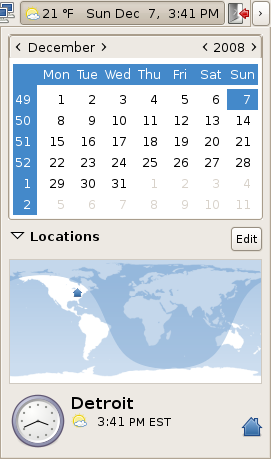
GNOME Calendar Start on Monday
I know this is an old post, but searching the web this really helps me:
I followed your instructions on creating a new custom locale, changed the first_weekday and saved, then I looked into the /etc/environment and it only had the PATH variable (I’m using Linux Mint 18.2 Mate).
After that I changed the locale on /etc/default/locale (that had LC_TIME) but it didn’t worked, then i “egrep -n ‘LC_TIME’ ./.*” in my home directory, which gave me ./.pam_environment, and changing there I could finally change the first day of the calendar!!!
Thanks a lot
OMG!! – Ubuntu is destroying the spirit of the well constructed shell
I followed the instructions in this post and rebooted, but Sunday was still displayed as the first day of the week, and now manual pages don’t display certain characters correctly and man(1) shows this error:
man: can’t set the locale; make sure $LC_* and $LANG are correct
Total fail.
This didn’t work for me at all.
I tried changing it in /etc/environment and in /etc/default/locale, and neither worked.
I also tried the locale-gen trick mentioned above, but that failed too.
At one point, the change had been made, but Firefox complained about an unknown locale, and wouldn’t start. Undoing the changes fixed the problem.
This really ought to be easy.
thanks for the tutorial.
there is just one minor issue 🙂 – it is unable to start NetBeans (v6.7.1) after the path to LC_TIME is changed to a custom file.
Editing /etc/default/locale worked perfectly for me.
@Denis: maybe you did the same mistake as I – the quotation marks shown in Fer’s comment are “typographical”, as opposed to “standard” plain old quotes (ASCII 34); I blame WordPress. If you copied from the browser and pasted, the locale variables will include the funny characters and for example “cal” will say:
cal: setlocale: No such file or directory
I ran “sudo vi /etc/default/locale”, replaced the quotes (in this particular case the quotes aren’t even needed), logged out/in, and everything’s peachy.
In 9.10 do not change environment OR /etc/defaults/locale
For example ccsm will not run after that !!!
After you change and save:
first_weekday 2
run in terminal
sudo locale-gen
then log out and log in
Wollaaaa
Ohhh I forgot to change my /etc/environment
That did the trick.
By the way, during the search I also found that editing the file /etc/defaults/locale this way (adding the last three lines):
$ sudo gedit /etc/default/locale

LANG="en_US.UTF-8"

LC_TIME="en_GB.UTF-8"

LC_PAPER="en_GB.UTF-8"

LC_MEASUREMENT="en_GB.UTF-8"
I will get American english, but time, paper size and units in British i.e. weeks starting with Mondays, A4, metric.
(In this case is not necessary edit the /etc/environment)
Thanks a lot
Fer – I just tried this on Jaunty and it worked for me. My computer has been upgraded from 8.04 to 8.10 to 9.04. I don’t know if it would be different on a fresh install.
My /etc/environment file looks like this:
PATH=”/usr/local/sbin:/usr/local/bin:/usr/sbin:/usr/bin:/sbin:/bin:/usr/games”
LC_TIME=”en_US_custom.UTF-8?
Fer – I have not tried this yet in Jaunty. I’ll try to take a look at it tonight and see what’s going on.
Sorry commenting out of subject, but I could’t find a “contact” link.
In past December you posted about how to “Change the Week Start Day in Ubuntu“. It is not working for me in Jaunty. Does it change something from Hardy or I’m doing something wrong? Did you try in Jaunty? Same way? Thanks a lot.