If you run the Google Gears add-on for Firefox on Linux, then you’ve probably been getting annoyed by Firefox trying to update the add-on and getting a failure message that interrupts your web browsing.
Incompatible Extension
“Google Gears” could not be installed because it is not compatible with your Firefox build type (Linux_x86-gcc3). Please contact the author of this item about the problem.

The problem is that the extension updater thinks there is a new version available under version number 0.5.33.0. The fix for this problem is pretty simple. We just need to edit one of the extension’s files so that Firefox thinks you have version 0.5.33.0 instead of 0.5.32.0.
You will need to find the correct file in your Firefox profile directory. If you have Gears installed to more than one profile, then you’ll need to make this change to each profile. Here’s the path to the file on my computer. The parts highlighted in bold will most likely be different for you.
[term]/home/userid/.mozilla/firefox/ev2sy1ud.default/extensions/{000a9d1c-beef-4f90-9363-039d445309b8}/install.rdf[/term]
Open the install.rdf file in a text editor and go to the line that looks like this (line 61):
[term]<em:version>0.5.32.0</em:version>[/term]
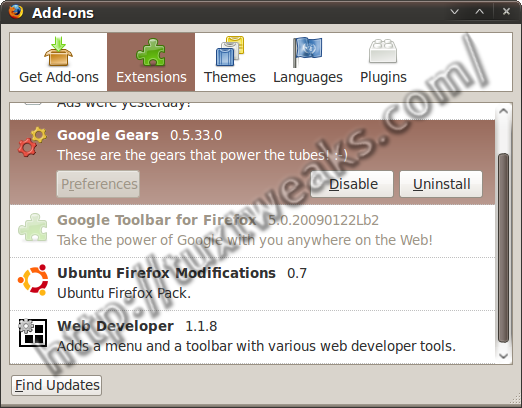
Change the 2 to a 3 and save the file. Restart Firefox and you should be all set. Google Gears now shows up as 0.5.33.0.
This didn’t fix it for me.
Yeah, it worked for the past few weeks and then I’ve just recently started getting the error message again. I haven’t taken the time to dig into it more yet.
OK. I seem to have found a fix. It hasn’t been thoroughly tested, but so far, so good.
Edit the install.rdf file and remove or comment out this line:
[term]<em:targetPlatform>Linux_x86-gcc3</em:targetPlatform>[/term]
It should be line number 76.
OK, that didn’t do it. I’ve now removed the updateURL line. That ought to do it. If they ever actually release an update I’ll have to install it manually, but that’s OK if I don’t have to look at that stupid pop-up any more.