If you’ve ever been a KDE user, you are probably familiar with the Amarok music player. Perhaps you prefer GNOME over KDE but you really prefer Amarok over the music players normally offered in GNOME. You could always go ahead and install Amarok, but it brings along a ton of KDE dependencies. Good news! There is a GTK+ alternative.
The Clementine music player is a GTK+ based music player and according to the official website, it’s “inspired by Amarok 1.4”. Clementine is a cross platform music player that is available for Linux, Mac OS X, and Windows.
Features
Search for and play your local music
Internet radio: Icecast, Jamendo, Last.fm, Magnatune, SomaFM
Create playlists
Visualizations
Lyrics, artist biographies, photos
Transcode music
Edit tags
Download album art
Remote control with a Wiimote
Copy music to your music player
Download
You can download Clementine for your system from the official download page at: http://www.clementine-player.org/downloads
Install in Ubuntu
You can install Clementine in Ubuntu by downloading the .deb from the above location. Alternately, you can enable a PPA and install it from there.
[term]sudo add-apt-repository ppa:me-davidsansome/clementine
sudo apt-get update
sudo apt-get install clementine[/term]
Or, if you want the latest and greatest bleeding edge version, use the development PPA.
[term]sudo add-apt-repository ppa:me-davidsansome/clementine-dev
sudo apt-get update
sudo apt-get install clementine[/term]
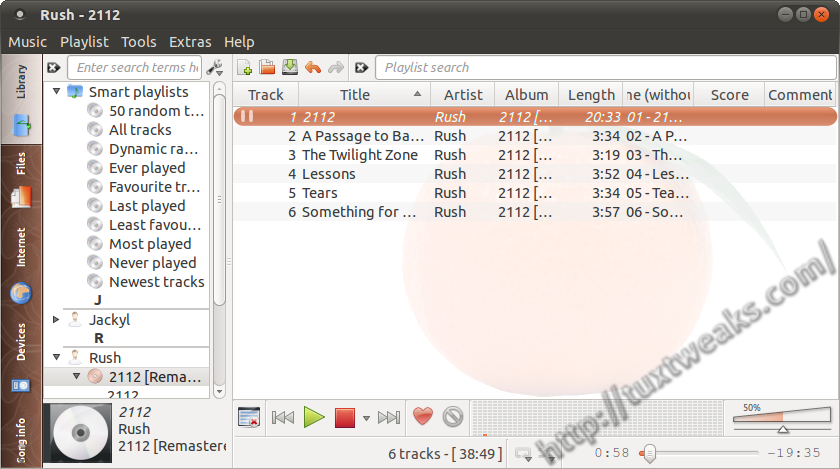
It’s actually Qt4 🙂