Sponsors
Tags
Apache Apple audio avast bash Chromium command line dell Distro Review fedora firefox flac gadgets gnome google google chrome grub GStreamer HowTo HP humor ImageMagick jaunty karmic koala LAMP linux Linux Mint Lucid Lynx mp3 Nautilus netbook network news ogg open source opinion phpMyAdmin review security text edit Ubuntu usb web development windows WordPress
How To Select Your Log-in Manager in Ubuntu
If you've added the Kubuntu packages to Ubuntu, or vice versa, then you can choose whether you want to use KDM or GDM to act as your log-in manager.
To choose your log-in manager, open a terminal and enter
sudo dpkg-reconfigure kdm
Or alternatively
sudo dpkg-reconfigure gdm
It doesn't matter. Either one will work.
Hit [Enter] on your keyboard to move past the message screen.
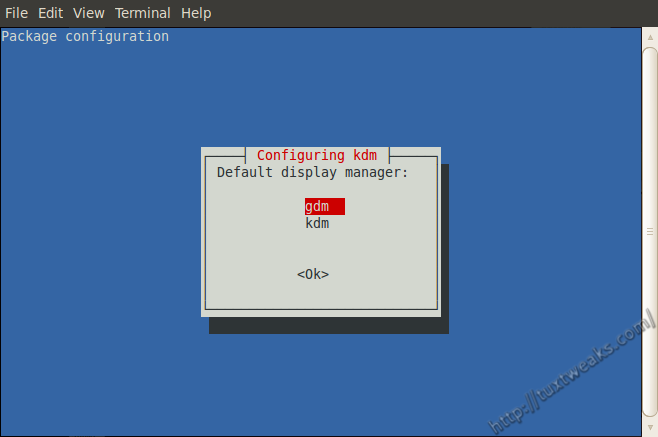
Use your arrow keys to select gdm or kdm and hit [Enter].
That's it. Your chosen log-in manager will show up the next time you boot your computer.
Comments
One Response to “How To Select Your Log-in Manager in Ubuntu”
Leave a Reply Cancel reply
Subscribe by email
Top Content
- 6 Things To Do After Installing Ubuntu 13.04
- How To Control Fan Speeds in Ubuntu
- Remove Old Kernels In Ubuntu With One Command
- Distro Review: Xubuntu 13.04 Raring Ringtail
- Send Gmail from the Linux Command Line
- How To Rotate The Screen in Ubuntu With The Nvidia Driver
- How to Configure Apache Web Server on Linux
- Install SSH and SFTP on Ubuntu or Linux Mint
- Fade Out Images with GIMP
- Review: Linux Mint 14 MATE Edition
Categories
-
Archives
- ▼ 2013 (7)
- ► 2012 (19)
- ► 2011 (25)
- ► 2010 (56)
- ► Dec (4)
- ► Nov (3)
- ► Oct (4)
- ► Sep (4)
- ► Aug (3)
- ► Jul (5)
- ► Jun (4)
- ► May (8)
-
- How To Rotate The Screen in Ubuntu With The Nvidia Driver
- Lynx: A Text Only Web Browser
- Midori - A Lightweight Web Browser
- From The "WTF, Apple?" Dept.
- There's Always One Bad Apple
- Ubuntu on "The Big Bang Theory"
- Organize Your Recipes with Gourmet Recipe Manager
- Add an Open Terminal Button to Nautilus
- ► Apr (6)
- ► Mar (5)
- ► Feb (3)
- ► Jan (7)
- ► 2009 (88)
- ► Dec (4)
- ► Nov (5)
- ► Oct (7)
- ► Sep (6)
- ► Aug (13)
-
- Enable The RT2860STA Linux Wireless Driver
- Fade Out Images with GIMP
- Command Line Basics: Redirecting Output
- Command Line Basics: View Files With cat
- Command Line Basics: Determine File MIME Types
- Batch Watermark Images in Linux
- How To Watermark Images With ImageMagick in Linux
- Nautilus Script to Launch a Terminal
- SUSE Studio Screenshot Tour
- Edit Your GNOME Configuration
- Open Source Apps for Windows to Introduce Users to FOSS
- Name The Next Apple Product
- Fast Boot Your PC With Xandros Presto
- ► Jul (5)
- ► Jun (7)
- ► May (11)
-
- Command Line Basics: Create Custom Commands with Alias
- Command Line Basics: List Files with ls
- Space Saving Tips for Your GNOME Desktop
- Windows Web Browser Shootout
- Command Line Basics: Navigating the File System
- Bash to Basics: Print Text with echo
- Command Line Basics: echo
- Install the Firefox 3.5 Beta in Linux
- Create a Bootable USB Drive with Ubuntu and FreeDOS
- Revert the Update Behavior in Jaunty to the Old Way
- Who Needs Windows?
- ► Apr (11)
-
- Install Picasa 3.0 for Linux (beta)
- Eight Reasons Your Next Computer Should Run Linux
- Jaunty Boots 32% Faster on the MSI Wind
- The Jackalope is Jaunting!
- Windows 7 Won't Close the Door For Linux
- Upgrade Ubuntu with a CD Image
- Get a Jump on Jaunty Jackalope
- Secure File Transfer in Nautilus with SFTP
- Add the NT Backup Tool to Windows XP
- Why I hate Dell
- How To Install AVG Antivirus 7.5 in Ubuntu
- ► Mar (13)
-
- Create an Encrypted Folder in Ubuntu with Cryptkeeper
- How To Create Multiple Firefox Profiles in Windows
- Install the Fedora 10 Desktop Theme in Ubuntu
- Download the Fedora 10 Wallpaper
- How To Install the Echo Icon Theme in Ubuntu
- How To Install the Nodoka Theme Engine in Ubuntu
- Create Your Own .deb Packages with Checkinstall
- Install Your Own Ringtones with Ubuntu and BitPim
- Install Multimedia Codecs in Ubuntu 8.04
- Use Linux to Solve the Linux Journal Scramble
- Dvorak Rings Death Knell for Microsoft's Business Model
- Microsoft to Release Windows Linux!
- Review: Sabrent 68 in 1 Internal Card Reader
- ► Feb (2)
- ► Jan (4)
- ► 2008 (37)
- ► Dec (8)
-
- Update: Logitech LX8 in Ubuntu
- Create a Button to Restart USB in Ubuntu
- Create an Ubuntu Live USB Drive
- Install Fedora Cursor Theme in Ubuntu
- Change the Week Start Day in Ubuntu
- Automatically Update the ClamAV Virus Database
- Add On-Demand Virus Scanning to Nautilus
- Put Your Own Face on Tux - Wii Fit Review
- ► Nov (6)
- ► Oct (8)
-
- Ubuntu 8.10 is Out!
- Split mp3 Files With mp3splt
- How To Install RealPlayer 11 in Ubuntu
- How To Install Free42 in Ubuntu
- Review - Sony MDR-NC6 Noise Canceling Headphones
- How To Set Up a Home Network With Ubuntu, Part 3
- How To Set Up a Home Network With Ubuntu, Part 2
- How To Set Up a Home Network With Ubuntu, Part 1
- ► Sep (6)
- ► Aug (9)
-
- How To Control Fan Speeds in Ubuntu
- How To Install avast! Antivirus in Windows XP
- How to Launch a Program in Ubuntu Without Using The Menu
- Review - Logitech LX8 in Windows XP
- Google Starts "Free The Airwaves" PR Campaign
- Review - Logitech LX8 Cordless Laser Mouse
- Subway Doesn't Like Linux!
- How To Add An Item To Ubuntu's Menu
- How to resample MP3 audio files on Linux using LAME
Favorite Sites


Story added...
This story has been submitted to fsdaily.com! If you think this story should be read by the free software community, come vote it up and discuss it here: