Today I’m going to show you how to install the Lynx web browser in Ubuntu 10.04. Lynx is a text only web browser that runs from the Linux terminal.
Why install Lynx?
Why would you want to run a browser like this? Well, the reason I run it is because it shows you how a website looks to a search engine bot. The bot can’t see the images you have on your page, or the fancy Flash animations, etc. All the bot can see and understand is the textual information on your page. So using a browser like this can be helpful in SEO of a website.
Installing Lynx
So let’s get down to it. Open a terminal window and enter:
[term]sudo apt-get install lynx-cur[/term]
Once the installation is complete, you can run Lynx from the command line with:
[term]lynx[/term]
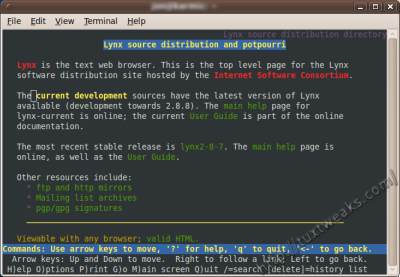
Using Lynx
Using Lynx is quite easy. There is a menu listing the keyboard options at the bottom of the screen. To open a web page, type g and then enter the URL at the prompt. To navigate through a web page you can use the up/down (?/?) arrows on the keyboard to move from link to link. The space bar will scroll down the page one screen length. You can also navigate using the Page Up and Page Down keys. To follow a hyperlink, use the up and down arrow keys to select it, then use the right arrow (?) or the Enter key to follow the link. Use the left arrow (?) to go back to the previous page.

Lynx on TuxTweaks.com
You said:
Installing Lynx
So let’s get down to it. Open a terminal window and enter:
sudo apt-get install lynx-cur
BUT WHAT IS TERMINAL WIDNOW ?? PLS HELP !
Hit [Alt]+[F2] and enter gnome-terminal in the command box to open a terminal window. You can also find it in the menu under Applications→Accessories→Terminal.
Terminal emulator:
https://secure.wikimedia.org/wikipedia/en/wiki/Terminal_emulator
http://linux.org.mt/article/terminal
Kisskiss