Sometimes you just need a DOS boot disk. Many motherboard manufacturers and computer companies only provide DOS based BIOS update utilities. A further challenge is that many computers no longer have floppy disk drives. The solution is to create a bootable USB drive that boots to FreeDOS. The beauty of this method is that you can create a DOS boot drive using only free software.
(Note: If you’re looking for a way to make a bootable DOS flash drive in Windows, see: Create a Bootable FreeDOS USB Drive on Windows.)
I figured this out by reading the Gentoo Wiki and adjusted the instructions to work with Ubuntu 9.04.
First off insert the USB drive into one of your USB ports. The following steps will wipe out all of your files, so backup anything you want to keep.
Open GParted through System->Administration->Partition Editor.
Select the USB drive in the upper right corner. Make note of the device name. You’ll need this later. In my case it’s /dev/sdc.

Gparted USB Drive
Select the device in the lower portion of the window. Right click and select Unmount.
Select the device again and format it to FAT16 with Partition->Format to->fat 16. Click Apply to do the formatting.
Select the partition and go to Partition->Manage Flags and make sure that the device is marked as bootable.
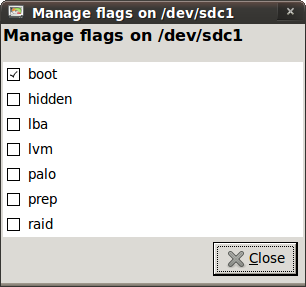
Make Device Bootable
Your screen should look something like this now.

USB Formatted to FAT16
Close Gparted.
Open Nautilus and select your flash drive to mount it.
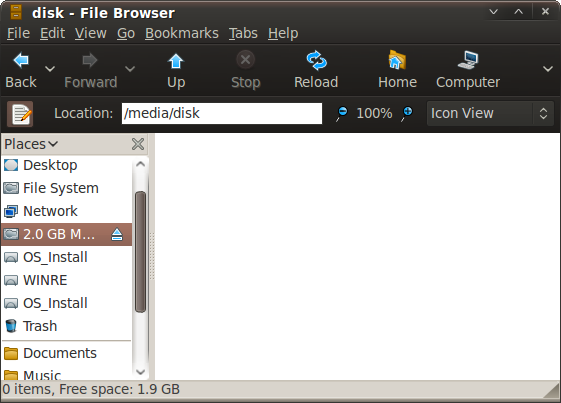
USB Drive in Nautilus
Download the FreeDOS image from http://odin.fdos.org/odin2005/odin1440.img and save it to the flash drive. Edit 29-Nov-2010: The Odin link no longer works. Use this one: http://www.ibiblio.org/pub/micro/pc-stuff/freedos/files/distributions/unofficial/balder/balder10.img.
Create a folder called grub on your usb disk and then copy all of the files from /usr/lib/grub/i386-pc to your new grub folder. The i386-pc part is architecture specific, so this may be different for your computer.
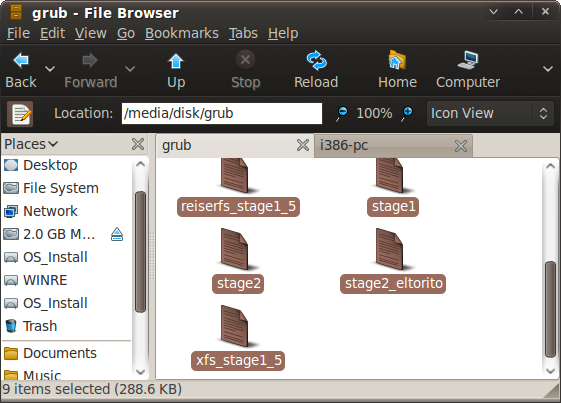
USB grub Folder
Also copy /usr/lib/syslinux/memdisk to the root of your USB drive.
Paste the following text into a text editor and save it as /media/disk/grub/menu.lst.
default=0
timeout=10
root=(hd0,0)
title FreeDOS
kernel /memdisk
initrd /balder10.img
Now we need to install grub to the USB drive. Open a terminal and enter the following:
Note: make sure to substitute your device name from the Partition Editor for /dev/sdc.
cd /media/disk
sudo grub

grub> device (hd5) /dev/sdc
grub> root (hd5,0)
grub> setup (hd5)
grub> quit
As the Gentoo page mentioned, you may get a few non-fatal errors that you can ignore.
That’s it. You can now copy your BIOS flash files to the USB drive and reboot your computer. Don’t forget to set your computer’s BIOS to boot to USB.
After booting to the USB drive, the partition containing your BIOS file will show up as the C: drive. Enter
[term]c:\[/term]
to switch to the C: drive.
NOTE: As mentioned in the comments, it’s easier to create a bootable FreeDOS USB drive with UNetbootin.
Please forget my previous comment, figured out by myself.
I thought it was something required for the usb drive to boot.
thanks I usually install a MsDos small 1st partition and boot it with Ranish rpm -> grub. But would like to try freeDos.
I dont understand this sentences:
“That’s it. You can now copy your BIOS flash files to the USB drive and reboot your computer.”
What are the BIOS flash files? is this the equivalent of io.sys?
and:
“great. I just flashed the BIOS on my MSI Wind with this”
i followed the instruction on this page on a ubuntu9.04 live cd (because my machine is running 10.04 with grub2 installed, 9.04 use grub0.97), all of the steps were fine. when i boot with the usb I got the usual grub menu with FreeDOS option.
the part that got wrong was when I boot FreeDOS, it got an error saying something like
MEMDISK: error no ramdisk image specified!
I tried to make this work on grub2 before and got the same error, can anyone shed some light on it please…
was it something to do with the syslinux that i use? because i copied the memdisk file fom ubuntu10.04
Did you leave out the step where you COPY the .image to the drive? Or are we supposed to guess that, too?
I still get ‘permission denied’ when I do: cd /media/disk (which is a blank folder).
I know enough to know that is vague or at least version specific, why won’t it work on mine? What else can I try?
Proofread what you post and make sure that it makes sense and is followable.
I am bitter because I seem to do this BS research every six months or so, AND THERE IS NEVER AN EASY WAY TO DO THIS?>????QQ!!!!!!!!!!!! Why? Why is booting a F(*&ing USB FLASH DRIVE SO HARD!~!!!!
(18 years computer tech experience).
You were supposed to “guess” the copy part from:
“Download the FreeDOS image from
http://odin.fdos.org/odin2005/odin1440.imgand save it to the flash drive.”I DO proofread what I post and it DOES WORK in the version of Ubuntu that I mentioned at the beginning (Ubuntu 9.04).
I don’t know why things are so hard for you. Perhaps you struggle with reading comprehension. You should have been able to see the link to an easier method that was provided at the end of my post. All I can say is that I’m able to figure this stuff out and I post it here in hopes it might be useful for someone else. (16 years mechanical engineering experience, 0 years computer tech experience.)
This didn’t work for me either. The /mnt/disk instruction were off for my version (I think) and I couldn’t make ANY sense of your ‘install grub onto USB stick’ instruction.
I go CD /media/3796-A54A
(to mount my drive, doing it your way didn’t work, permission error, plus there is nothing in that folder when I browse to it (so I know that location is bogus)
and type “sudo grub”
“grub not found” I thought this was the step where you tell us to how to INSTALL grub on the drive. How would we be able to EXECUTE it BEFORE it is installed?
This tutorial is WACKED.
Waste of time. Thanks anyways.
From my post:
“I figured this out by reading the Gentoo Wiki and adjusted the instructions to work with Ubuntu 9.04“.
Since then Ubuntu has changed from Grub to Grub2, so these instructions will most likely not work with a recent version of Ubuntu. Note that I wrote this post almost 2 years ago. A lot of things change over the course of 2 years in the Free & Open Source world.
I suggest you try the UNetbootin method that I mentioned at the end of my post. It’s much easier. http://tuxtweaks.com/2009/09/create-a-bootable-freedos-usb-drive-on-linux-with-unetbootin/
This worked for me to update the bios on my dell e6400.. I had to specify the “lba” flag in “Manage flags…” otherwise the freedos environment would hang when doing any operation on the C: drive. My flash drive is 4GB, the smallest one they had at Target!
Worked for me, except for the grub script. Here’s what I did: When I booted from the flash drive, the grub didn’t load FreeDOS, only got as far as the grub> prompt. Answer: simply type part of the script right there:
kernel /memdisk
initrd /balder10.img
then
grub> boot
and FreeDOS will load and you’re on your way. Also, I burned, in my case video ROMs and flashing program onto a CD and inserted it, switched to D: drive and voila! I couldn’t get to the flashing program or ROMs when they were on the same drive as FreeDOS. Good luck!
Recommend Windows Unetbootin based solution, FWIW. Didnt get results with Linux based method despite multiple attempts. Make FreeDOS USB stick, put DOS exe pkg from http://www.samsungpc.com on stick, boot to stick and execute via command line. Each step went perfectly first time. Coulda been me tho 🙂
Am using Ubuntu 10.04 and the above instructions worked for me, except I used http://www.ibiblio.org/pub/micro/pc-stuff/freedos/files/distributions/unofficial/balder/balder10.img because the odin img no longer exists. Needed to do ‘change drive to C:’ as mentioned eight posts above this one. I had previously tried unetbootin but that did not install FreeDOS correctly.
Was doing this to update the bios on my Dell Inspiron 1525 from A16 to A17 in the hope that it would fix my problem of the laptop battery not charging because it did not recognise the (genuine) Dell charger. Unfortunately the battery needs to be partially charged for this to work – and my battery is discharged because the laptop doesn’t recognise the charger. Catch 22.
Otherwise, very good.
Thanks for the tip on the new link. I’ll have to update the post.
Sorry about your battery. Hope you can find a solution. Years ago I had similar issues with a Dell laptop at work. The battery charge light would only come on for a second or two and then go out. I unplugged and plugged back in several times and eventually got the thing to start charging. The only solution on another one was to swap batteries with another laptop. The battery charged in the other machine with no problem.
Posted a sweet method on my blog:
http://blog.realcomputerguy.com/
Two posts combine to make a swiss army knife USB stick:
Add SystemRescueCD capability to your USB stick
&
Add bootable DOS support to your USB stick
Please comment on the posts about any likes, difficulties, improvements, etc.
Thanks,
Chris
Worked from Fedora 12 (x86_64) although I had to create
/media/disk/grub/grub.conf
with the contents of mentioned
/media/disk/grub/menu.lst
for it to actually boot FreeDOS.
Thank you, spcwingo
Will this work on Ubuntu 9.10?
This did not work for me. For a detailed walkthrough, see my post at http://raywoodcockslatest.blogspot.com/2009/08/trying-to-use-freedos-usb-drive-to.html
@Ray – I looked through your post. I should have perhaps stated things more clearly. In your grub commands you should have used
grub> device (hd5) /dev/sdd1
based on the device you had in GParted.
I’ll edit my post to make it more clear.
It looks like UNetbootin requires a larger USB stick.
Why not just use unetbootin to get FreeDOS on a USB stick? It’s much easier with the same end result.
Thank you for this! This is just what I needed.
However, I don’t really know how to use this. Where do I have to put, say, a bios file and a bios installer (dos) utility?
I’ve tried to put in straight on my usb key (root of it) but couldn’t tell how to find them once I booted with the key. I’m stock in A:\ with the basic .exe dos program?
Hehe… thank you!
Sorry, I should have mentioned in the post that your USB stick will show up as the C: drive when you boot to it. Just enter c:\ at the prompt and you’ll be at the root of your flash drive.
Overall it works great. I just flashed the BIOS on my MSI Wind with this.